How much time do you spend every evening making sure the till figures match the accounts?
At Odoo Experience 2026, three talks were about the POS. I went through the recordings of all three. Odoo 20 was announced in September 2026, so these features are still new. The first covered cash reconciliation and hardware, the second the analysis of margin and stock turnover, and the third self-ordering for hospitality venues.
I am not writing about a live Odoo 20 implementation of my own, only about what the speakers showed. Where I give my own tip, I say so.
One session, one invoice
Marion, Odoo's POS expert, gave the first talk. The talk started with what an accountant wants to see: how much VAT has to be paid, how much I earned, and whether the cash adds up.
According to Marion, in Odoo 20 one POS session corresponds to one customer invoice. All orders from the session are included on a single invoice, so there is no more complicated mixed journal entry. You can still ask for an invoice per order.
Three further changes affect the closing process:
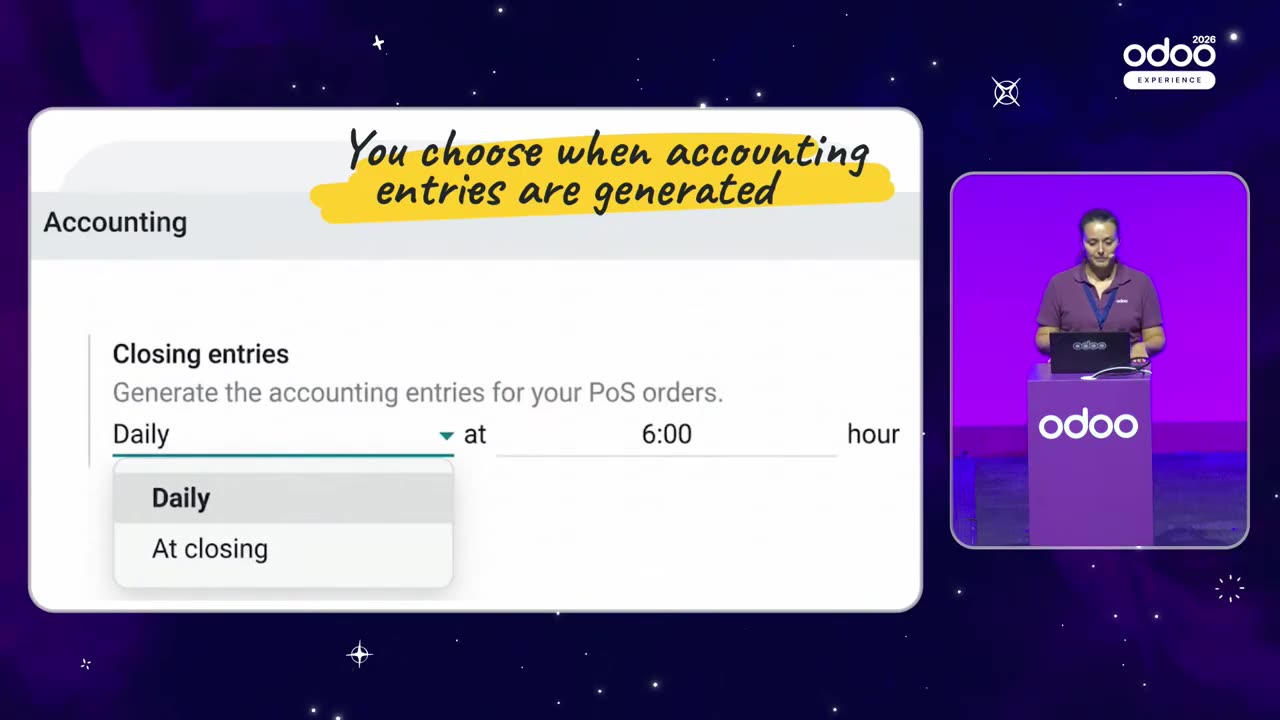
- The accounting entries can be created at closing, as before, or on a schedule, for example every day at six o'clock. According to the speaker, many shops do not close each session separately, which is why scheduling was needed.
- The opening and closing cash balances are recorded in the cash journal automatically. You do not have to book the €100 opening balance by hand, and at closing the cash taken out and the difference can also be tracked.
- When prices include VAT, the Sales details report also shows the amount excluding VAT.
Source: Odoo Experience 2026, the official Odoo recording
Tip: before you go live, work through with your own accountant exactly which accounts the customer invoice and the cash journal entry are posted to under Hungarian accounting practice.
Fewer devices behind the counter
Hardware affects the initial cost. According to the talk, one POS configuration can have several devices: printers A and B, a cash drawer, a customer display, even a spare printer.
Local Network Access is a Chrome feature: the browser connects directly to the printer, and you do not have to import an SSL certificate. It is only available in Chromium-based browsers, for example Chrome and Brave. It does not work on iOS, so Odoo's developers released a free app in the App Store so that an iPhone or an iPad can print directly. On an Android device with two screens and a built-in printer, you can print over USB.
The scale and the label printer can work without an IoT Box. Marion put it like this: “Thanks to the USB connectivity, you don't need an IoT anymore”. This has been available since 19.4.
There are two caveats worth knowing.
For the scale, this does not apply in countries that require certification. According to the speaker, the certification is tied to Odoo's major version, and at the time of the talk it was expected within a month.
Among payment providers, Mollie and Worldline connect through an API, without an IoT Box, but Worldline requires a specific terminal model. Among cash handling machines, Cashmatic joined Cashro and Glory.
Tip: clarify with the supplier what the certification rules mean for the scale in Hungary. If you have a shop, ask them before you leave the IoT Box out of the budget.
Who can operate the till?
In Odoo 20, “supervised” is a new permission level. A user set up this way can only take orders and cannot even select a customer. It is meant for students and beginners, and the manager keeps full permissions.
Commission can also be recorded in the POS, tied to a user. According to Marion, commissions also work for light users. Odoo 20 now supports light users.
The talk also demonstrated appointment booking, delivery charges and support for multiple currencies.
Appointment booking. It can be managed from the till. The example was a hairdresser; the resource can be a machine or a person, and both arrivals and no-shows can be recorded from the till.
Delivery. The delivery fee can be fixed or depend on conditions (in the example, free above €50), and eligibility can be tied to a maximum distance. In the example this was 20 km.
Multiple currencies. Payments can be made in multiple currencies, with an exchange rate applied.
What the customer sees at the counter
You can add labels to products with a long press, for example to indicate allergens such as gluten, milk or egg. The optional product feature displays a pop-up suggestion, such as a coffee to go with the croissant. The till also recognises the combo. If the croissant and coffee together qualify as a cheaper breakfast combo, you do not have to ring up the combo separately.
Pause. A product can be taken off sale temporarily for one, two or four hours, or until the end of the session.
Expiry and unit price. When you scan a lot (production batch), you get an expiry warning. The reference unit shows the price per kg or per litre.
Refund. It starts from the customer order: you load the order in the POS, select the product and issue a refund.
Stock tracking. According to the speaker, for simple stock tracking you do not even need the Inventory app.
Receipts. A separate receipt can be set up per shop, with a phone number, an email address, an address and a logo. There are three kinds of receipt: full, simplified (with the VAT breakdown, without the products) and a gift receipt, without the amount.
Margin and stock turnover together
The second talk was given by Sarah, a former shop manager. The claim is simple: profitability is not the same as selling more. “Profit is not only about selling more, but how many money we make out of every sale”.
Sarah looks at two numbers. One is the margin. The other is stock turnover, that is, the cost of goods sold divided by the average stock. In Sarah's words: “is my money sitting on the shelves?”.
In Odoo, the two figures come from two reports: the average stock from the Inventory report, the margin from the Sales report. From these, Sarah built a custom dashboard that classifies the products.
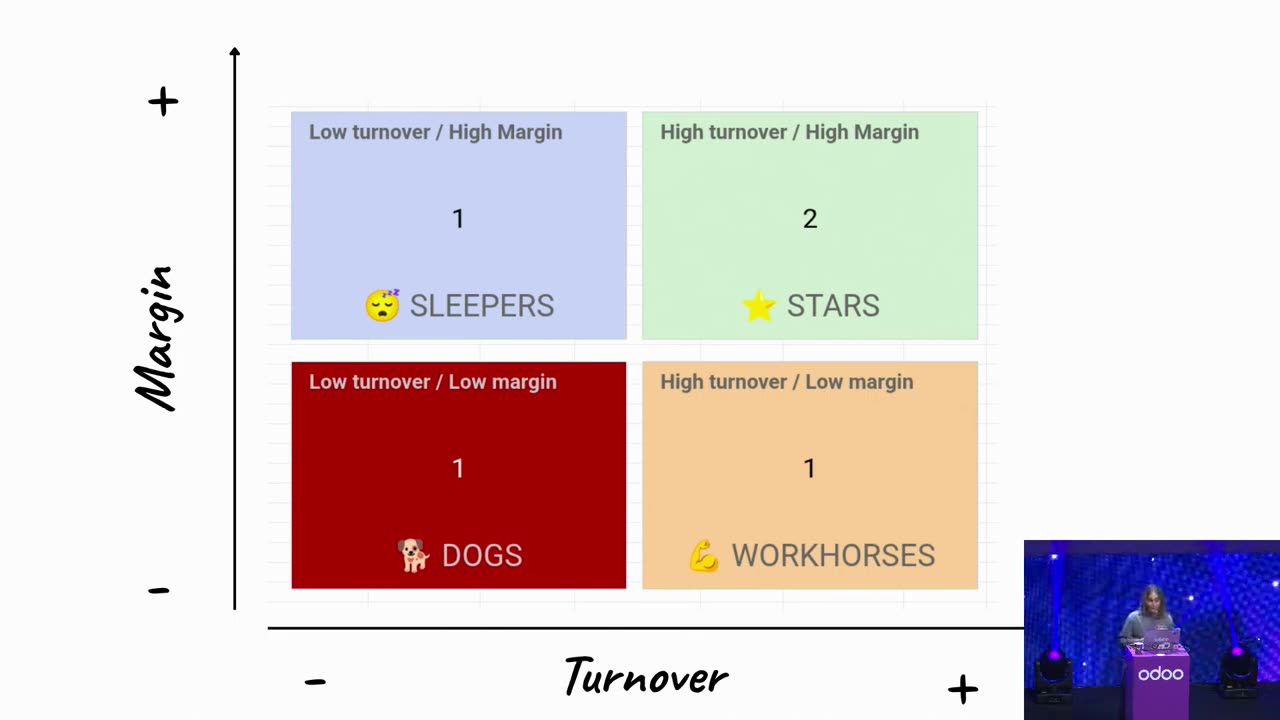
The classification gives four quadrants. The names are Sarah's own English words; the Hungarian equivalents used in the Hungarian version are my translation:
- Star: high turnover, high margin. In the example, the T-shirt and the scarf.
- Sleeper: high margin, low turnover. The hat.
- Workhorse: high turnover, low margin. The polo shirt.
- Dog: low turnover, low margin. The trousers.
The threshold is based on an industry benchmark or your own historical data.
Source: Odoo Experience 2026, the official Odoo recording
The less risky step first
Sarah ranked the promotional actions by increasing risk. Visibility comes first: the hat goes into the shop window or next to the till. In the example, this had no effect. Then came the bundle.
The rule: “We're going to use what works to sell what doesn't”.
The scarf is €38, the hat €28, together €66. The bundle price was set at €55. Whoever buys a scarf gets the hat for €17, and according to Sarah this is an additional sale generating additional margin. In Odoo, the bundle is a combo-type product with a price of €55 and selectable items.
The speaker showed the result in a pivot table. In the last week of September, the margin was 931, with 51 units sold. In the first week of October, the margin grew by €50, and 10 more hats were sold. Scarf sales remained unchanged at 40 units, with 10 sold as part of the bundle.
According to the speaker, the average basket value fell somewhat, since the bundle is €55, not €66. But 21 hats sold instead of 11. If the hat were a dog, Sarah probably would not bundle it: at a low margin, the bundle would only bring the margin down.
Sarah also gave one warning: base your assessment on two weeks of data. If every scarf sells in the bundle, the bundle cannibalises standalone scarf sales, and the bundle price has to be balanced carefully.
If you want to see from your own Odoo data which of your products is a star and which is a dog: I will help you build the report.
The first consultation is free and non-binding.
When is a discount worth it?
Sarah also showed how the margin changes when you give a discount. A 10% discount is given on the trousers. The margin per unit falls from 9 to 3 as a result.
The question is how many units you need to sell to maintain the total margin. The formula: the current total margin divided by the new margin per unit. In the example, the starting point was 5 units, giving a total margin of 5 × 9 = €45. After the discount, the margin per unit is €3, so 45 / 3 = 15 units are needed to maintain the same total margin.
The figure given in the talk was fifty units, but the figures quoted imply 15. The principle remains the same: if the margin per unit falls to a third of its original level, the number of units sold must triple.
According to Sarah, you first have to find out why the product is not selling.
If the price is the problem, a discount can help. If customers do not like the style, a lower price may not be enough. For seasonal products, maybe. Ask your sales staff what they hear from shoppers.
Restaurant, snack bar, bakery: kiosk, QR and mobile ordering
The third talk was given by Bo, Odoo's hospitality expert. The talk showed three channels: the kiosk, ordering from a mobile phone, and a QR code on the table that lets customers view the menu and place an order.
The kiosk's opening screen can now display a video, not just an image, and the colour of the LED frame can be matched to the brand. At the start of the order, the guest can choose to eat in or take away. This can still be switched before payment.
The “i” icon shows product information and allergen icons. When an item goes into the basket, a pop-up suggestion appears, for example dim sum with the soup. Before payment, the till recognises the combo: the customer sees a “€2.50 saving” message, and the kitchen receives the order as a combo. Before payment, a tip can also be given, 15, 20 or 25%, or any amount.
The mobile interface is the same. You can choose a menu without photos, because the menu changes often. The customer can also write a note, for example “straw”, and it appears in the POS.
Even with the till closed, you can order for later: the interface shows that the shop is closed at the moment, but the order can be placed for later. In the POS, a sound alerts staff to an incoming order, and orders placed for later are visible so staff can prepare them.
Two features address an ingredient running out and the peak-hour rush. A product that has run out can be taken out of self-ordering temporarily, even for 2 hours, with a countdown. The guest sees that the product has run out, but the cashier can still sell it. At peak times, self-ordering can be paused entirely, for example for an hour.
Two practical conditions: the printer needs to be on the same network, but the guest can order on their own mobile data. Options for changing ingredients, such as “no salad”, need to be configured in the back end, and an ingredient that is left out does not reduce the stock.
Where would I start?
This is my own suggestion, not one made in the talks. You do not need to roll out every feature at once.
- Session invoice and cash entry. I would start with a joint test with your accountant, in a test environment, because it affects the closing process right away. The question should be whether the customer invoice and the cash journal entry are posted to the same accounts as before.
- Margin and stock turnover from your own data. A dashboard can be put together from Odoo's two built-in reports. At first, just look at where your money sits on the shelf. Once you can see the four quadrants, for your first promotional action follow Sarah's order: try visibility first, and base your assessment on two weeks of data.
- Hardware and kiosk. I would take this up only afterwards. Before that, sort out the certification of the scale, and whether your payment terminal can be connected without an IoT Box.
I wrote about the announcement of Odoo 20 in a separate article . I summarised the other topics of the event in my Odoo Experience report .
FAQ
When was Odoo 20 announced?
According to the official release notes, in September 2026. They do not give an exact date.
Does it need an IoT Box?
According to the talk, the scale and the label printer can be used without an IoT Box, over a USB connection, and this has been available since 19.4. For the scale, there is an exception for countries that require certification. For Worldline, the terminal model matters. In Hungary, it is worth clarifying the rule with the supplier of the device.
Is this an AI feature, and does it use AI credits?
None of the new features in the three talks was an AI feature, and AI credits were not mentioned. If you use an AI feature later, you have to check its credit consumption separately. I wrote about the credits in the announcement article .
Which of the features shown is already available in Odoo 19.4?
Using the scale and the label printer without an IoT Box has been available since 19.4. The session invoice and support for multiple devices under a single configuration were presented as new features in Odoo 20.
Would you like to discuss with me which solution could be useful for your shop, bakery or restaurant?
The first consultation is free and non-binding. Glazer-Innovation has worked with Odoo for seven years, since Odoo 13, and has been in business for more than 25 years.
References
- Odoo Experience 2026: What's new in POS Retail: https://www.youtube.com/watch?v=JpxTYJcHdMg
- Odoo Experience 2026: From POS data to profit: The KPIs behind real retail growth: https://www.youtube.com/watch?v=kXm5XbrGXbA
- Odoo Experience 2026: Tap, Eat, Repeat: Boost your sales with our intuitive self ordering tools: https://www.youtube.com/watch?v=6Nkm60JdhWE
- Odoo 20 release notes: https://www.odoo.com/odoo-20-release-notes