A cost changes, and suddenly the whole quote needs redoing? Day two of Odoo Experience had an answer for that too, alongside inventory tracking and warranty repairs. Here are three concrete stories straight from the demos.
Quotes: cost and margin, linked together
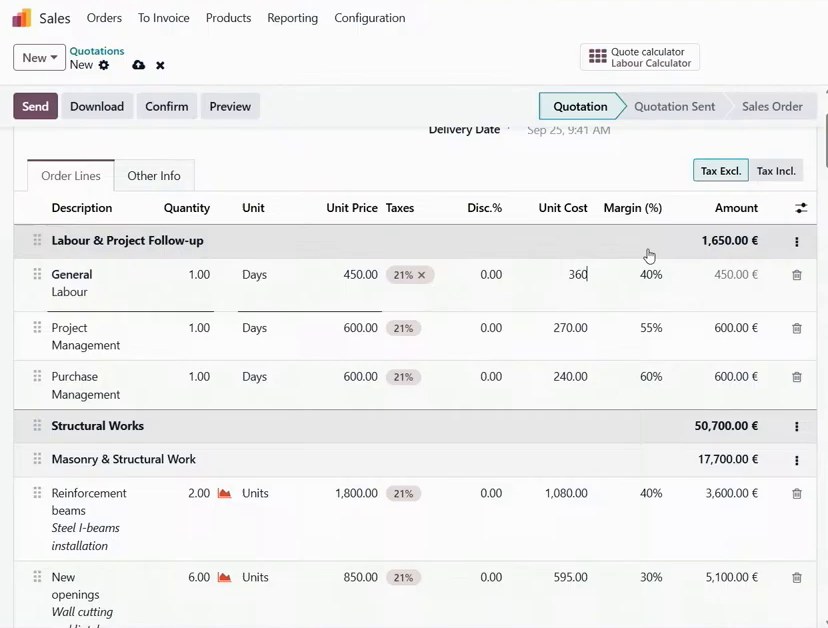
In the demo, Fabien asked Fabrice, playing the contractor, for a quote to build a café as part of a planned extension to his sports club. Fabrice put the quote together live, on the call. He started with a template, added a separate section for replacing the windows, then noticed that the unit cost for one labour item had risen from 270 to 360. That immediately showed that the margin would have dropped from 40% to 20% if he had left the selling price unchanged. Fabrice then set the margin to 25%, which pushed the unit price from 450 to 480. He entered the estimated number of working days in a separate spreadsheet, which calculated the quantities and populated the corresponding quote lines automatically. The final quote came to €233,000 for a four-month build. Once the customer accepted it, the system automatically created a delivery and a project with eight tasks.
Source: Odoo Experience 2026, official recording by Odoo
Inventory tracking without a warehouse module: the story of a pink lamp
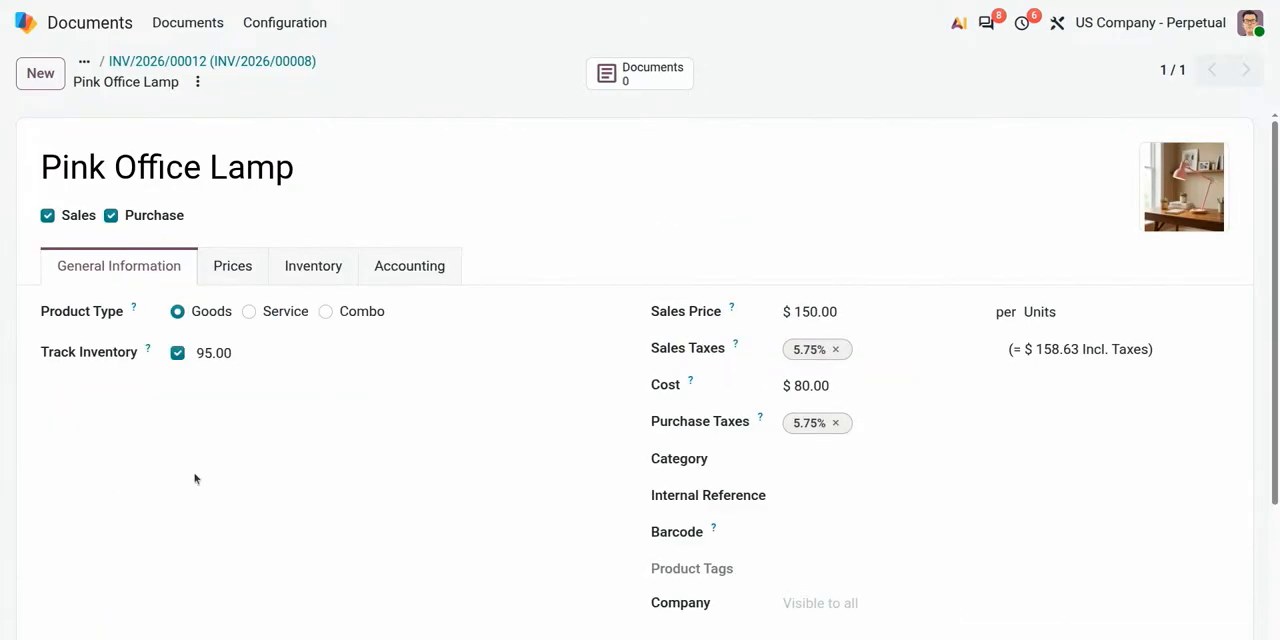
If all you need to know is how much stock you have and what it's worth, you may not need a full warehouse module. The demo showed how a bookkeeper could track a client's stock quantities and value using supplier bills and customer invoices, without a full warehouse management system. In the demo, they created a new product — a pink table lamp — and left the cost price blank; the system works it out from the supplier invoice instead. Posting a supplier bill for 100 units increased the recorded stock quantity to 100. Posting a customer invoice for five units reduced it to 95. With the settings used in the demo, the system also recorded the cost of goods sold automatically. For accounting firms, small retailers, and webshops that don't need full warehouse management right now, this can mean a simpler starting point — and according to the demo, the same setup can later grow into full warehouse management if things get more complex. This is Odoo 20's new Mini Stock feature (from the What's New in Inventory session).
Source: Odoo Experience 2026, official recording by Odoo
Warranty repairs in a single flow
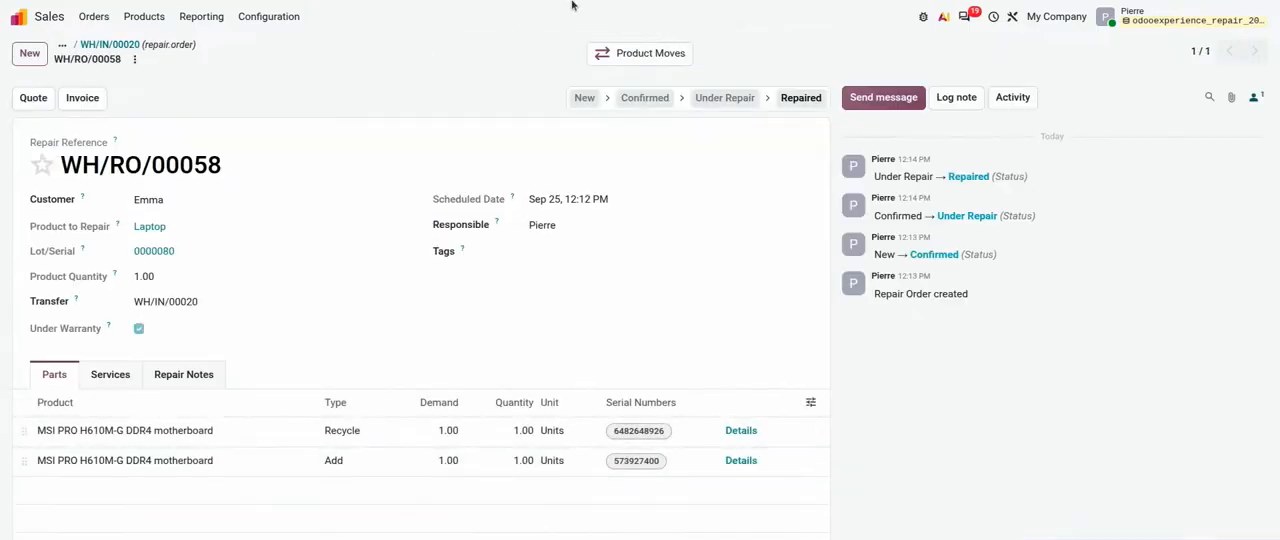
If you service or repair the products you sell, the paperwork is familiar: where do you record that a returned item's repair is under warranty, and what happens to the part you take out? In the demo, a customer bought a laptop and brought it back a month later for repair. A single click on the return opened a repair order with the customer's details and the product's serial number already filled in. Selecting the warranty checkbox on the repair order automatically sets the invoice total to zero. The removed part — a motherboard in the demo — was returned to stock for use in a refurbished machine, while the replacement part was deducted from stock. If your service department handles returned products, this ties the return, the repair, and the stock movement into one flow, instead of the separate records you might be juggling now. You still need to check whether the product is under warranty, for example by checking the purchase date. According to the demo, there's no ready-made automatic solution for this..
Source: Odoo Experience 2026, official recording by Odoo
Want to talk about Odoo 20?
What takes up the most time for you: preparing quotes, tracking inventory, or handling repair paperwork?
Tell me briefly how you currently handle quoting, inventory tracking, or repairs. I'll go through it with you and see what's useful for your business.
Request a consultation about Odoo
The first consultation is free, no strings attached.
References
- Odoo 20 & Industries keynote, Odoo Experience 2026, Brussels, Odoo's official YouTube channel: https://www.youtube.com/watch?v=Y9GPIJd_n90
- Mini stock: Inventory tracking without the complexity, Odoo Experience 2026, Odoo's official YouTube channel: https://www.youtube.com/watch?v=xgqFtcrSVb0
- What's new in Inventory?, Odoo Experience 2026, Odoo's official YouTube channel: https://www.youtube.com/watch?v=FnO0Z7A0v5w
- The quick turnaround: Master repair workflows in Odoo 20, Odoo Experience 2026, Odoo's official YouTube channel: https://www.youtube.com/watch?v=vzvFfN11Mzs