If you're choosing a business management system right now, you've probably already heard this one: "that'll be in Odoo 20." Don't base your decision on it. Ask what works today instead, and ask for a verifiable example. If your international company operates in Hungary, don't base an ERP decision on what may arrive in the next Odoo version. Ask what works today, how it fits your local operation and group-level systems, and what evidence supports the answer.
I'm Gábor Glázer. I work on Odoo implementations. I'm not going to predict what's in Odoo's next major version. I'll walk through what's worth asking your vendor, and show what a verifiable answer to that question actually looks like.
What's officially known — and what's just speculation
I checked Odoo's official conference page. It lists OXP 2026 in Brussels, 24–26 September. No release date for the next major version is listed there.
The further promises floating around about database architecture and approval workflows — I found those in partner blogs, not in an official announcement. I'm not saying they're false. I'm saying they're unverified, and that's something you should know before a purchasing decision.
I'm drawing this line sharply because I'm about to give you numbers of my own in the sections below. The fair thing is to show you first where the line sits between what I know and what I've only heard.
What to ask your vendor if they promise AI
If you're choosing an Odoo partner right now, four questions will get you most of the way. None of them is designed to catch anyone out. Their purpose is simple: find out whether your vendor actually uses what they're recommending to you, in their own company.
- Which version do you run in your own company? Not at your clients' sites — in your own day-to-day work.
- Which AI features have you turned on, and which have you left off? The reasoning behind what's turned off often tells you more than the list of what's turned on.
- Did you build custom development on top of it, or are you using the out-of-the-box features? Either is fine — it just needs to be said plainly.
- If the built-in AI sends data to an external provider, what do you recommend to a client for whom that isn't acceptable?
Whoever answers these concretely is worth continuing the conversation with. Whoever points to the next version, ask them what works today instead.
In the sections below, I'll show you the level of detail you can reasonably expect in an answer, based on my own live system.
What a verifiable answer looks like
On my own live Odoo 19 system, a set of out-of-the-box AI modules is installed, clustered around five areas: document handling and accounting, sales, an internal knowledge base, the website, and the core system.
I've deliberately left some stock AI modules turned off — the ones tied to live customer-support chat, since I don't currently run customer-facing live chat for them to serve.
A feature list alone doesn't say much on its own. It says more when a vendor also shows you what they left off, and why.
Don't take any number on faith — not even mine
I didn't take the module count on faith, including from myself. I queried the system for the list of installed AI modules, and the flawed first version of that query returned a suspiciously large batch of plausible-looking matches, so I checked each one individually.
The search matched the letters "ai" anywhere inside a word, which pulled in every module with those two letters somewhere in its name: mailing, newsletters, mail campaigns, the Gmail connector. None of them has anything to do with artificial intelligence.
The lesson here isn't really about me anymore. The broken query didn't return zero — it returned a plausible-looking number. Zero would have stood out, because it looks suspicious. A large-but-not-absurd count doesn't stand out, because it's large enough to sound credible and small enough to be believable.
That's why I went through the matches one by one before trusting any number. If a vendor gives you a number, this question is always fair: where did it come from, and what did you check alongside it?
What I built myself — and why I don't sell it as a product
The stock modules give you a shared foundation. On my system, alongside configuration and data, three custom pieces of development shape how it actually runs day to day. I use two of them in daily operations: one manages AI settings, the other powers a downloadable checklist generator on the website.
The third one is the important part: I connected Odoo's own AI query interface to a locally hosted, in-house knowledge base. Odoo's built-in AI features work with an external provider. In my setup, a colleague still uses Odoo's familiar interface, but the answer now comes from a system running locally. Same click, different destination for the data.
I don't offer this as a finished product, because it's built on my own knowledge base and my own processes. At another company, the data sources, access rights, and who's accountable for which answers would all need to be assessed separately.
Three AI agents, one of them home-grown
In Odoo 19, you can give an AI agent a defined task and access, so it works on the system's data within the rules you've set. On my system, three agents are active: two are stock, and I built the third myself in June 2026, called "GI Odoo Expert."
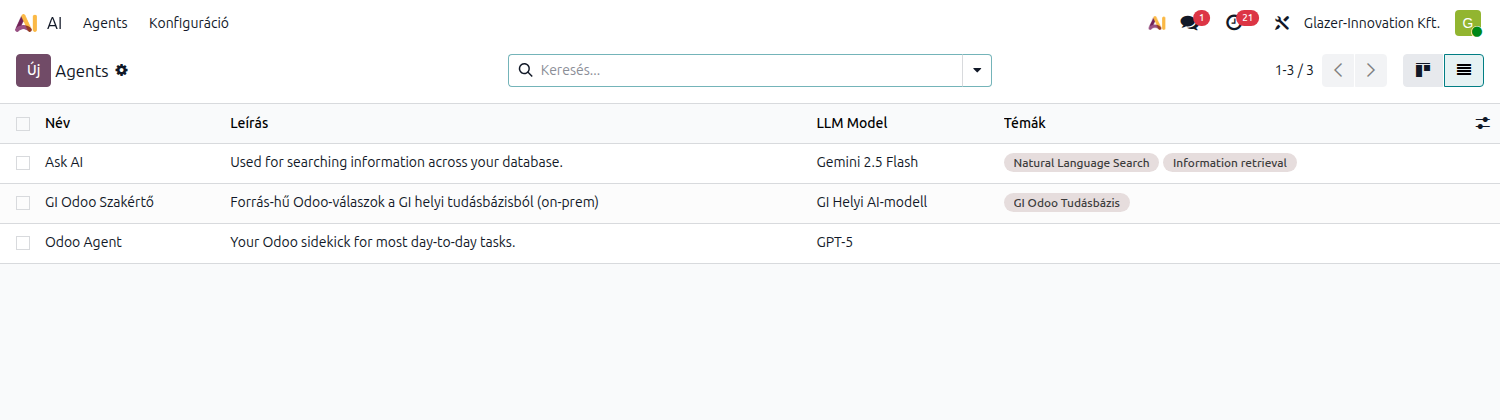
My own Odoo system's agent list. Three agents are running: two are stock — they use an external provider's model — and I set up the third to work against the company's internal knowledge base and a model I run locally. You can see it right there in the image: which agent talks to what.
A colleague can, for example, ask about an invoicing setting inside Odoo's interface, and the answer comes from the internal knowledge base I put together. The difference from a general-purpose chatbot is that this agent works from what I actually walked through and verified. It's been running for two months, and by now it's become a working tool.
Permissions need to be verified, not assumed
Building this on my own system doesn't automatically mean the same thing will work the same way for you. An internal query interface can't be allowed to bypass user permissions — that's something to verify in your own environment before any rollout, not assume.
When AI steps outside the conversation
One thing is worth thinking through in advance, because it carries a real risk. In Odoo, an automation rule can trigger an AI feature too, so it can run even when nobody's asking it a question.
In that case, you decide in advance whether the result becomes a suggestion waiting for approval, or something that can modify data directly. If it runs on its own and can write directly, it will also run on bad input, with nobody there to catch it. That's a configuration choice — but one that needs to be made deliberately, not left as a default along the way.
Let's look at which AI layer actually fits your processes. In a free, no-obligation 30–45 minute call, I'll go through the likely first step with you.
My September 2026 testing plan
I can answer this one without predicting anything, because it's not about what the system will know in the future. It's about how I work.
I'll wait for the official presentation and read what actually shipped. I test the released version in a separate environment first. Client work runs on my live system, so I don't experiment there during the first weeks after a major version change.
In the test environment, I first check what installs and what works with Hungarian settings. Then I separately verify whether a given feature is usable in Hungarian accounting practice. That typically takes weeks, not days.
Once that's done, I'll write about it — again with numbers, and again with what I didn't turn on. What I won't promise right now is which feature will turn out to be worth it. I need to see it first.
FAQ
When is the next major Odoo version coming out?
I'm not stating an official release date. OXP 2026 runs 24–26 September in Brussels; I'll examine whatever version actually ships in a separate test environment, and I'll write about it — again, with numbers.
Do you need Odoo Enterprise for the AI features?
For most of them, yes — the built-in query interface, for example, isn't available on the Community edition. A few run under a free license. The locally hosted knowledge base itself can run alongside Community too, but then not through Odoo's own interface — through a separate access point instead. Which path makes sense for you is something an assessment can clarify.
Does our data go to an external AI provider?
Odoo's built-in AI features work with an external provider, so content passed to the AI can end up in external processing. Where data can't go to an external provider, I connected Odoo's query interface to a locally hosted system through my own development instead.
Did you turn on everything that's available?
No. Some stock AI modules are switched off on my system, because I don't have a process for them to serve. Turn on what has a job to do.
Are you counting every module with "AI" in the name?
No — a naive keyword search also matches modules like mailing, newsletters or the Gmail connector, which have nothing to do with artificial intelligence. I check each match individually before treating it as an AI module. That's exactly the point of this article: a number is only as good as the filter behind it.
Check your own setup
The numbers from my own system show the level of detail you can reasonably expect from a vendor. What matters for your decision is which process AI would actually help in your business, and under what conditions.
Book a free, no-obligation 30–45 minute assessment. We'll pick the first process where a realistic business result is likely, and decide whether built-in AI, a locally hosted setup, or simple automation fits it. We'll take that process forward into a detailed payback calculation.
The assessment is free and no-obligation.
More articles on AI in Odoo and on evaluating new Odoo versions are planned for the English site as well.